Stop Writing API Routes: Next.js Server Actions for Mutations (and When You Still Need Route Handlers)
By Sumit Saha
A practical, story-driven guide to moving UI-driven mutations from /api/* routes to Next.js Server Actions using <form action>, FormData, pending UI with useFormStatus, and server validation—plus the clear boundary for when Route Handlers are still the right tool (webhooks, public APIs, streaming, custom headers).

You know this feeling: you build a form, you hit Submit, and the UI updates… and you’re like:
“Cool. But… did that actually save anywhere?”
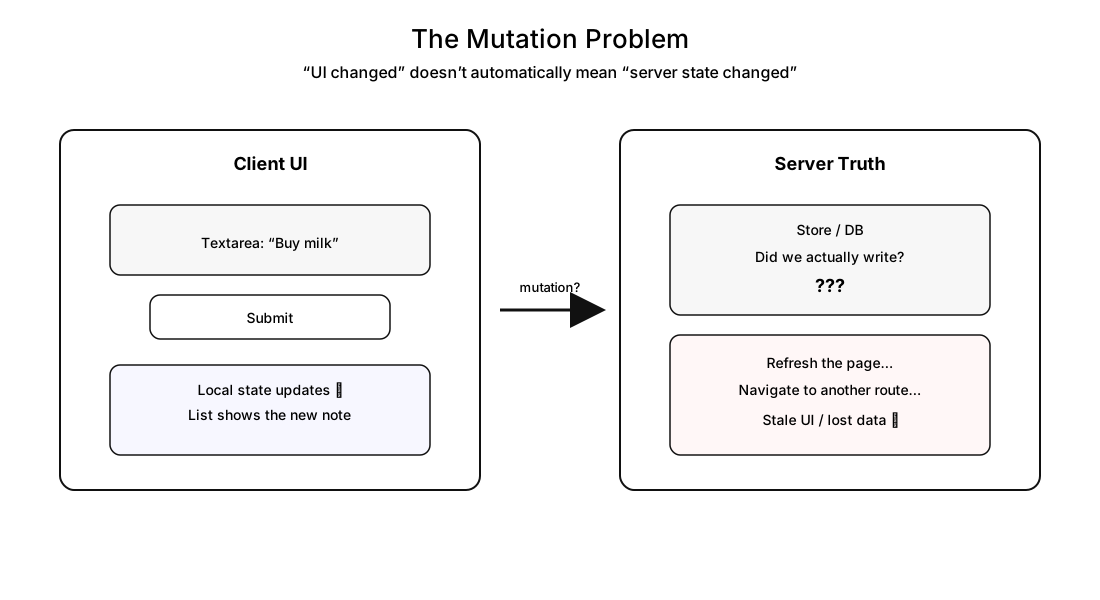
That gap between “my UI changed” and “my server state changed” is where a lot of Next.js apps get messy—extra API routes, duplicate validation, awkward loading states, stale screens, and the classic “it worked on this page but not on that page” problem.
In this article, we’ll build a tiny “Quick Notes” app and use it as a story to learn:
- why mutations feel slippery
- how Route Handlers solve it (and where they start to hurt)
- how Server Actions +
<form action>make mutations feel native - how to show pending states, validation errors, and multiple actions cleanly
- how to keep the UI in sync (revalidate/refresh/redirect/cookies)
- when to stop using Server Actions and reach for a Route Handler
- bonus: using
next/formfor navigation-style forms (search params)
What we’re building
A tiny notes app that can:
- list notes
- create a note (normal or important)
- validate input on the server and show errors in the UI
- clear all notes
- delete a note
- submit via keyboard shortcut (Cmd/Ctrl + Enter)
- render notes on a separate server-rendered page (
/notes) - create a note on a separate page and redirect back (
/notes/new) - expose webhook/public/streaming endpoints to show where Route Handlers still win
- add a search page that navigates using search params (
next/form)
Warning: For simplicity, we’ll use an in-memory store. Restarting the dev server wipes everything. That’s intentional—the point is the mutation workflow, not the database.
I’ve also created a video to go along with this handbook. If you’re the type who likes to learn from video as well as text, you can check it out here:
🎬 Watch the full tutorial: Next.js Server Actions (Forms & Mutations)
Table of contents
- The Mutation Problem: Why This Article Exists
- Baseline: Route Handlers as the “Classic API”
- The Mental Model: Server Functions vs Server Actions
- First Win:
<form action>+ Server Actions - Pending State:
useFormStatusanduseActionState - Validation: Zod + Returning Errors to the UI
- Advanced Form Patterns: Multiple Actions, Extra Args, Keyboard Submit
- Keeping UI in Sync: Revalidate, Refresh, Redirect, Cookies
- The Boundary: When Route Handlers Still Win
- Bonus:
next/formfor Navigation-Style Forms (Search Params) - Recap
- Appendix: Final code reference
The Mutation Problem: Why This Article Exists
A mutation is any action that changes server state:
- create a note
- update a note
- delete a note
- clear notes
If you don’t force yourself to answer “where is the source of truth?”, you end up with a UI that looks correct but isn’t.
Typical slippery symptoms:
- you update local state, refresh the page, and it’s gone
- you hit back/forward and see old data
- another route still shows stale content
- you start duplicating logic: one validation on the client, another on the server
- you create a Route Handler “just because mutations need an API”… even when only your own UI calls it
So our mission is simple:
Make mutations feel boring. The action runs on the server, validation lives on the server, the UI gets a clean “pending / success / error” experience, and other screens don’t lie.
Baseline: Route Handlers as the “Classic API”
Let’s start with the old-school, reliable move: a Route Handler.
We’ll create:
- an in-memory store in
app/lib/notesStore.js - an API endpoint at
app/api/notes/route.js - a client UI that
fetch()es notes and posts new ones
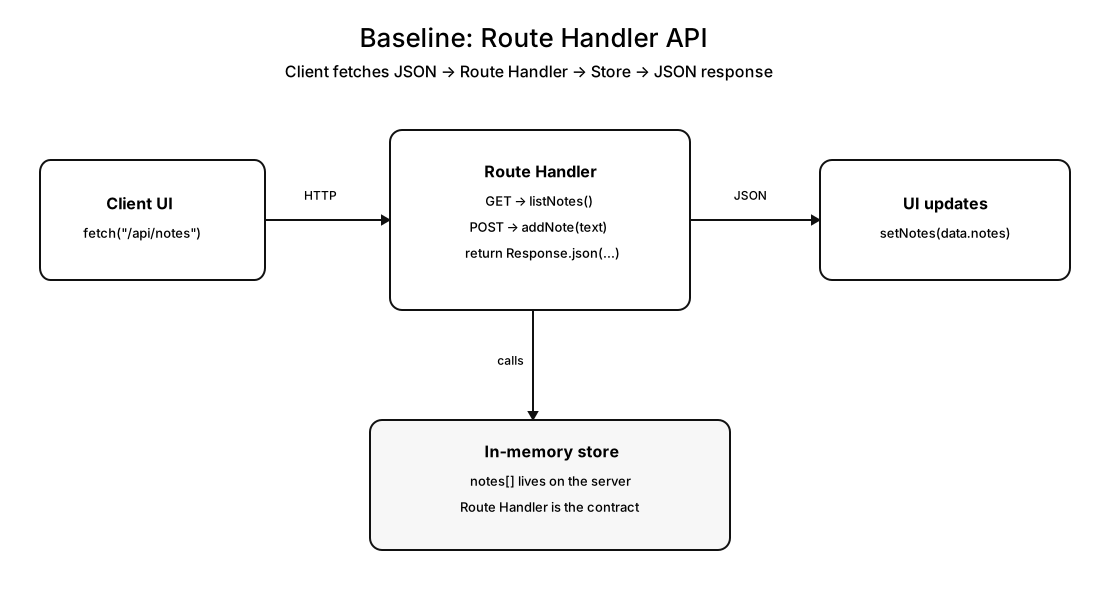
At this stage, our store can be minimal:
// app/lib/notesStore.js
let notes = [];

export function listNotes() {
    return notes;
}

export function addNote(text) {
    notes = [text, ...notes];
}
And the Route Handler gives us stable HTTP:
// app/api/notes/route.js
import { addNote, listNotes } from "../../lib/notesStore";

export async function GET() {
    return Response.json({ notes: listNotes() });
}

export async function POST(request) {
    const body = await request.json();
    addNote(body.text);
    return Response.json({ notes: listNotes() });
}
On the client, we fetch notes on mount, post on submit, then set state.
This works. It’s also the moment where the “classic API” tradeoff shows up:
- we now maintain HTTP contracts
- we validate in two places unless we’re careful
- pending states and error states become “our responsibility”
- we create routes that only our UI calls
Route Handlers aren’t bad. They’re just not always the best default when the caller is your own UI.
The Mental Model: Server Functions vs Server Actions
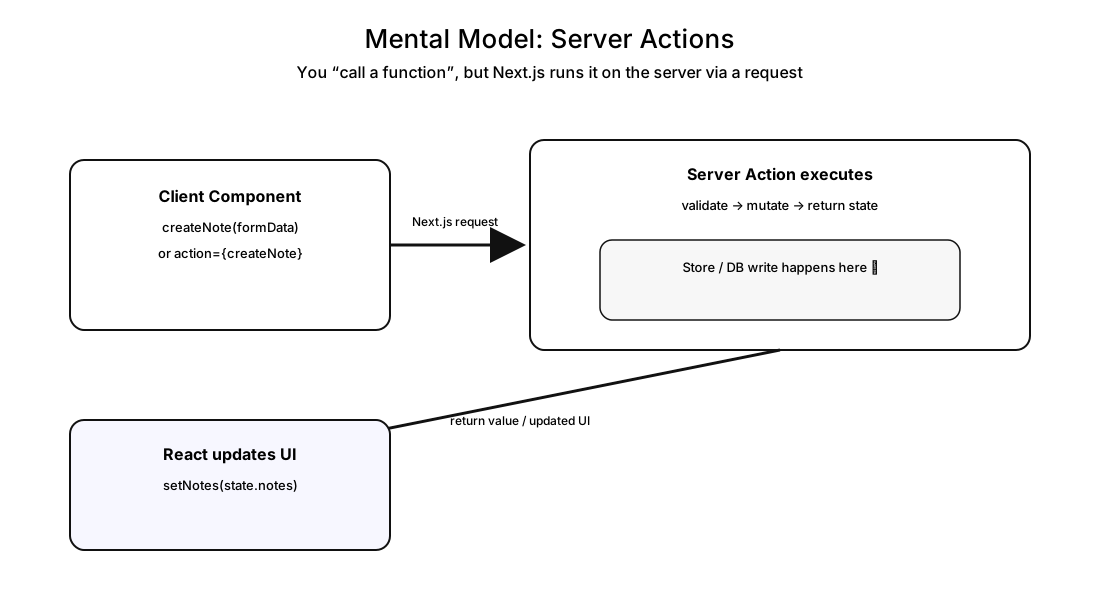
Here’s the key mental model that makes everything click:
- A Server Function runs on the server and can be called from the client via a network request.
- A Server Action is a Server Function used in a mutation context (typically through forms).
So instead of:
- client →
fetch('/api/notes', { method: 'POST' })→ route handler → store
We can do:
- client → call a server action → store
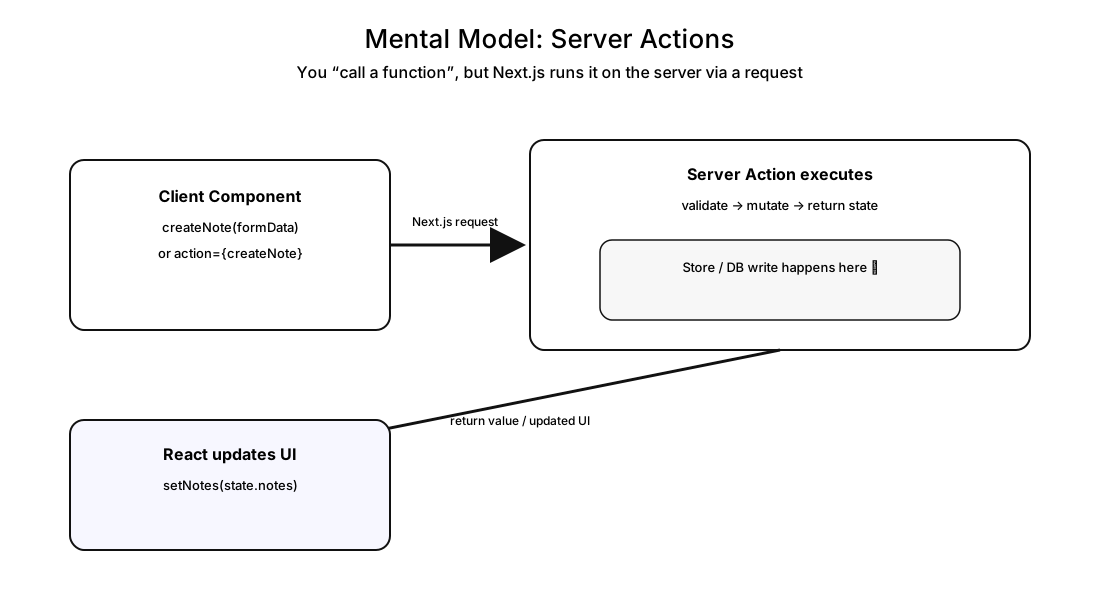
At first, it feels like magic because you “called a function” from the client. But the important detail is:
A Server Action is still a network request. It’s just packaged as a function call, and Next.js handles the plumbing.
First Win: <form action> + Server Actions
This is where it starts to feel native.
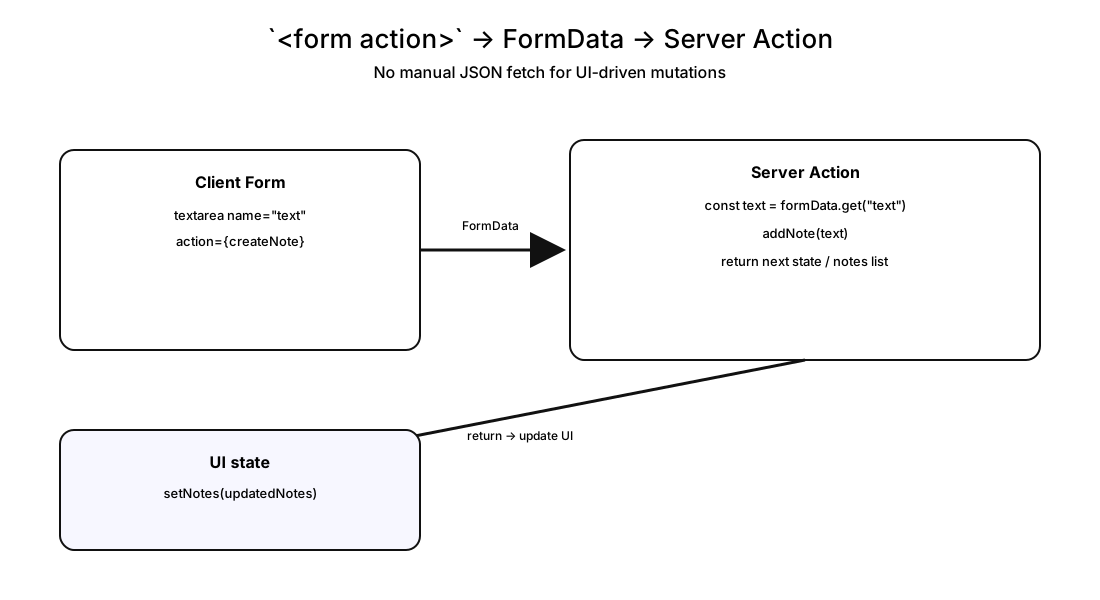
Instead of manually posting JSON, we lean into what forms already do:
- the browser builds
FormData - Next.js sends it to the server action
- the action reads
formData.get("...") - we mutate on the server
A basic server action looks like this:
"use server";

import { addNote, listNotes } from "../lib/notesStore";

export async function createNote(formData) {
    const text = formData.get("text");
    addNote(text);
    return listNotes();
}
And the client form becomes simple:
<form action={createNote}>
    <textarea name="text" />
    <button type="submit">Add note</button>
</form>
At this point, you’ve removed a lot of “API ceremony”.
But we still need a proper UX:
- disable buttons while submitting
- show validation errors
- support multiple actions cleanly
Pending State: useFormStatus and useActionState
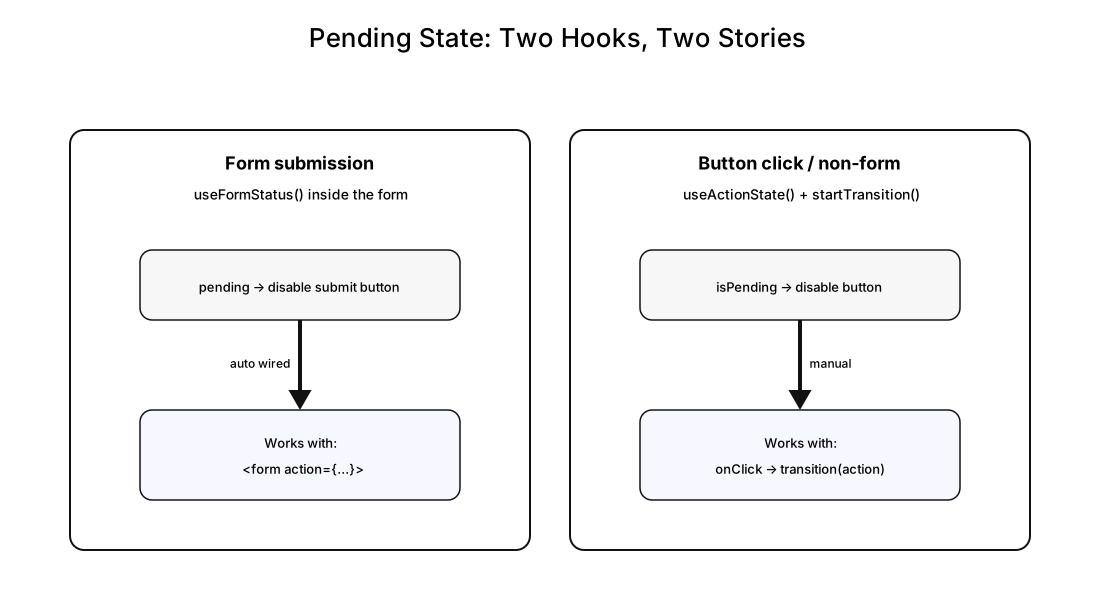
There are two “pending” stories:
- Form submissions → use
useFormStatus()inside the form - Non-form actions (button clicks) → use
useActionState()+startTransition()
Form pending (button lives inside the form):
"use client";
import { useFormStatus } from "react-dom";

function SubmitButton() {
    const { pending } = useFormStatus();
    return (
        <button type="submit" disabled={pending}>
            {pending ? "Saving…" : "Add note"}
        </button>
    );
}
Non-form pending (like “Clear all”) works best with useActionState:
const [clearState, clearAction, clearPending] = useActionState(
    clearAllNotes,
    null,
);

<button
    type="button"
    disabled={clearPending}
    onClick={() => startTransition(clearAction)}
>
    {clearPending ? "Clearing…" : "Clear all"}
</button>;
Tip: Think of it like this:
- forms get pending “for free” via
useFormStatus- random buttons need you to explicitly run the action inside a transition
Validation: Zod + Returning Errors to the UI
Now we make the mutation real: server-side validation with UI error rendering.
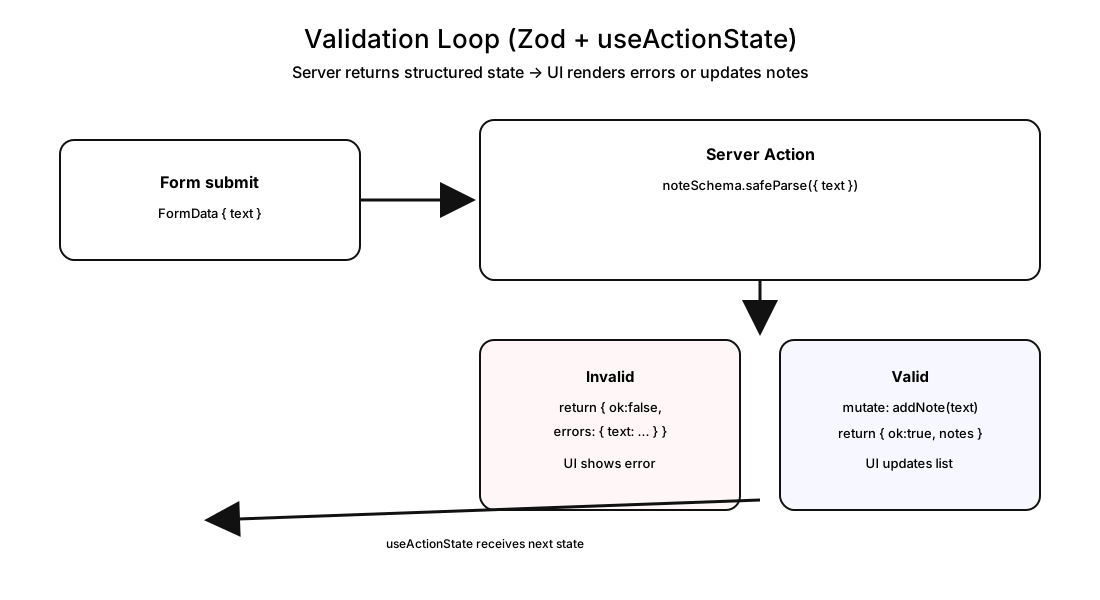
We’ll use:
zodon the serveruseActionState()in the client so the server action can return a structured state
Validation flow:
Server-side validation helper:
import { z } from "zod";

const noteSchema = z.object({
    text: z
        .string()
        .trim()
        .min(1, "Text is required")
        .max(200, "Too long (max 200)"),
});

function validateText(formData) {
    const result = noteSchema.safeParse({ text: formData.get("text") });

    if (!result.success) {
        return {
            ok: false,
            errors: result.error.flatten().fieldErrors,
        };
    }

    return { ok: true, text: result.data.text, errors: {} };
}
With useActionState, your server action signature becomes:
export async function createNote(prevState, formData) {
    // validate
    // mutate
    // return next state
}
And the client reads state.errors.text and displays it:
<p role="alert">{state.errors?.text}</p>This is the big win:
- validation lives where it belongs (server)
- UI stays simple
- you don’t need a separate API route just to return errors
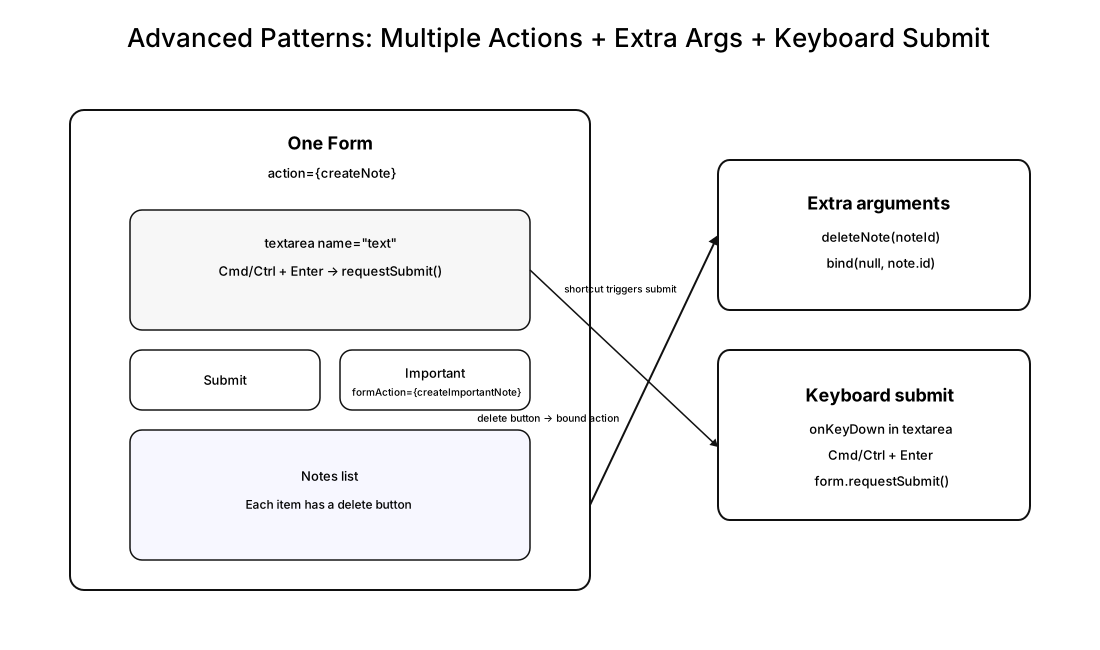
Advanced Form Patterns: Multiple Actions, Extra Args, Keyboard Submit
This section is about making forms feel productive, not fragile.
1) Multiple submit actions in one form
You can keep one form, but have different submit buttons do different actions using formAction.
<form action={createFormAction}>
    <textarea name="text" />
    <SubmitButton />
    <ImportantButton formAction={importantFormAction} />
</form>
function ImportantButton({ formAction }) {
const { pending } = useFormStatus();
return (
<button type="submit" formAction={formAction} disabled={pending}>
{pending ? "Adding…" : "Add important"}
</button>
);
}2) Extra arguments with bind
For something like delete, you usually need an ID.
Server action:
export async function deleteNote(noteId) {
    deleteNoteById(noteId);
    return { ok: true, notes: listNotes() };
}
Client side, bind the ID:
const deleteThis = deleteNote.bind(null, note.id);Then call it (often inside a transition, depending on your UX).
3) Keyboard submit (Cmd/Ctrl + Enter)
Inside the textarea:
function handleTextKeyDown(event) {
    if ((event.ctrlKey || event.metaKey) && event.key === "Enter") {
        event.preventDefault();
        event.currentTarget.form?.requestSubmit();
    }
}
That’s it. No weird hacks. Just a clean “submit the form”.
Keeping UI in Sync: Revalidate, Refresh, Redirect, Cookies
At this point, mutations work… but multi-page apps introduce a new class of bug:
You mutate data on one route, and another route still shows stale UI.
That’s not “your code is wrong.” That’s caching doing its job.
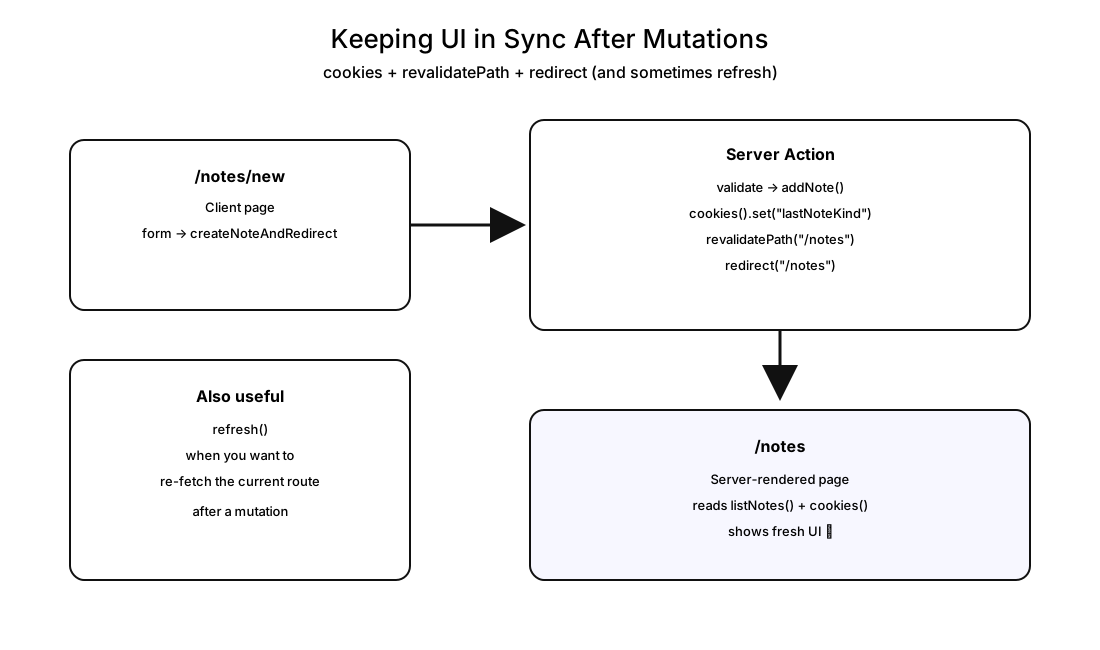
So we add a server-rendered list page:
app/notes/page.js(Server Component)app/notes/new/page.js(Client page that creates and redirects)
The tools
revalidatePath("/notes")→ invalidate cached UI/data for that pathrefresh()→ refresh the client router from within a Server Actionredirect("/notes")→ navigate after a mutationcookies()→ read/write cookies in server environments, and let the UI react to them
A typical “create and go back” action looks like:
export async function createNoteAndRedirect(prevState, formData) {
    const result = validateText(formData);
    if (!result.ok) return result;

    addNote(result.text, "normal");

    const cookieStore = await cookies();
    cookieStore.set("lastNoteKind", "normal");

    revalidatePath("/notes");
    redirect("/notes");
}
Tip:
revalidatePathis the “make this route honest next time it renders” button.redirectis the “take me to the honest route now” button.
The Boundary: When Route Handlers Still Win
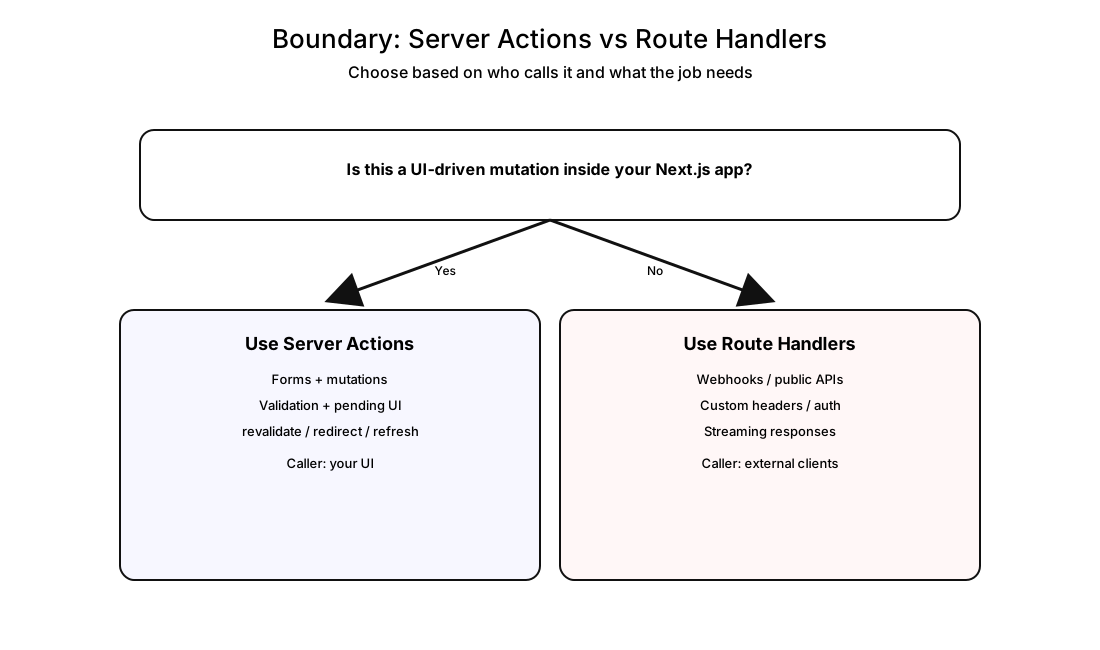
This is the clean boundary:
- If the caller is your Next.js UI and the job is a mutation → Server Actions + forms
- If the caller is external, or you need stable HTTP, headers, auth, streaming → Route Handlers
Examples where Route Handlers still shine:
- webhooks: external services POST to your app
- public APIs: other apps fetch your endpoint
- streaming: chunked responses, SSE, custom headers
- any contract you don’t want tied to the Server Action protocol
So we add a few sample endpoints:
app/api/webhooks/new-note/route.js(auth + JSON body)app/api/public/notes/route.js(public read)app/api/stream/route.js(real streaming)
That’s the point: Server Actions are not a public API. Route Handlers are.
Bonus: next/form for Navigation-Style Forms (Search Params)
So far, “form” meant “mutation”.
But search forms are different:
- they don’t save data
- they navigate to a URL like
/search/results?query=react
For that, Next.js gives you <Form> from next/form.
When action is a string, <Form> behaves like a GET form that updates search params and navigates cleanly.
We’ll create:
app/search/page.js→ formapp/search/results/page.js→ readsearchParams, filter notes, render results
This keeps search logic simple and avoids turning navigation into a “mutation”.
Recap
Here’s what we built (and what you should take with you):
- Route Handlers are great for stable HTTP contracts and external callers.
- Server Actions make UI-driven mutations feel native: less ceremony, fewer moving parts.
<form action={serverAction}>is the clean “mutation pipeline”.useFormStatus()gives you form pending states without extra wiring.useActionState()is your bridge for structured server responses (errors, messages, returned data).- Server-side validation (Zod) + returning errors → clean UX, no duplicate logic.
- Advanced patterns (
formAction,bind,requestSubmit) make forms powerful without becoming fragile. - Caching is real; tools like
revalidatePath,refresh,redirect, and cookies keep UI honest. next/formis perfect for navigation-style forms (search params), not mutations.
Appendix
You can grab the source code from here.
Show your Support
- ⭐ Follow this GitHub Repo
- 🍿 Subscribe on YouTube
- 🧑🏫 Follow us on LinkedIn, Facebook and X