Cloudflare Tunnel vs ngrok vs VS Code: The Localhost Showdown
By Sumit Saha
Benchmark Cloudflare Tunnel vs ngrok vs VS Code port forwarding with a repeatable test plan for HTTP latency, WebSocket stability, and auth overhead. Learn when to use each tool and lock in the fastest, safest localhost-sharing workflow for modern full-stack development.
You finish the feature. It works locally. And then someone says the sentence every developer hears sooner or later:
"Send me a link."
That's where tunneling lives. You're not deploying. You're not buying infra. You're just trying to expose localhost to the public web for a bit: a teammate review, a webhook callback, a mobile device test, or a client demo.
But "just expose it" is where trade-offs get real:
- The fastest link is not always the safest link.
- The safest link can add annoying authentication friction.
- The tool that "works" for HTTP can fall apart under WebSockets.
In this guide, we'll do a practical showdown between Cloudflare Tunnel, ngrok, and VS Code Port Forwarding - with a simple benchmark plan you can rerun anytime to pick the best tool for your workflow.
I've also created a video on Cloudflare Tunnel. In that guide, I explained how to use Cloudflare Tunnel to securely make any project running on your local computer public. Yoou can check it out here:
🎬 Watch the full tutorial: Cloudflare Tunnel: Make Localhost Public Without Port Forwarding
Table of contents
- The battle for your localhost
- What we will benchmark
- Build a tiny test app
- The seamless built-in: VS Code Port Forwarding
- The veteran contender: ngrok's speed and simplicity
- The enterprise powerhouse: Cloudflare Tunnel
- The final verdict and workflow optimization
- Recap
The battle for your localhost
In 2026, tunneling isn't a "nice to have". It's basic infrastructure for modern dev work:
- You're building an app that needs webhooks (Stripe, GitHub, Slack, payment gateways).
- You're testing on a real phone on a different network.
- You're pairing with a teammate, doing a quick review, or showing progress to a client.
- You're running a local "staging-like" environment while your real staging is busy or locked down.
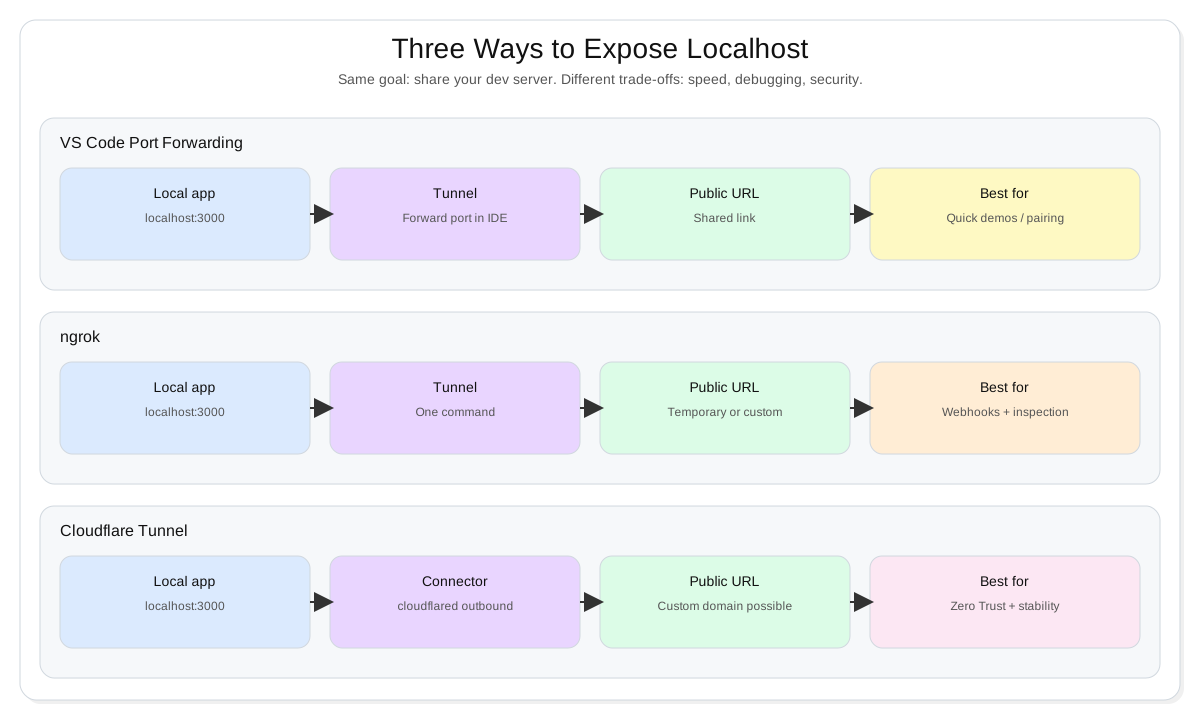
Now here's the catch: all three tools in this article solve the same problem, but they optimize for different things.
- VS Code Port Forwarding optimizes for speed of sharing (it's right in your editor).
- ngrok optimizes for developer UX + debugging (inspection, replay, "see what hit my server").
- Cloudflare Tunnel optimizes for security + stability (Zero Trust style access control, long-running tunnels).
Warning: A tunnel is still a public entry point. Treat it like a tiny production surface area: restrict access, avoid exposing admin routes, and shut it down when you're done.
What we will benchmark
If your tunnel only needs to handle a few clicks, almost anything feels "fine".
The problems show up when you do real full-stack things:
- your frontend opens WebSockets (live updates, collaborative editing, presence, realtime dashboards)
- your app does a burst of parallel API calls
- someone refreshes while a webhook is firing
- you add authentication and now the link is "secure" but painful to use
So we'll benchmark three categories:
- Latency
- Time-to-first-byte (TTFB) and tail latency (p95 / p99) on a simple endpoint.
- WebSocket stability
- Does the connection stay alive?
- Do you see random disconnects under light concurrency?
- Does reconnect feel smooth or brittle?
- Authentication overhead
- How hard is it to restrict access safely?
- How annoying is it for the person who opens the link?
Here's the run as a simple pipeline:
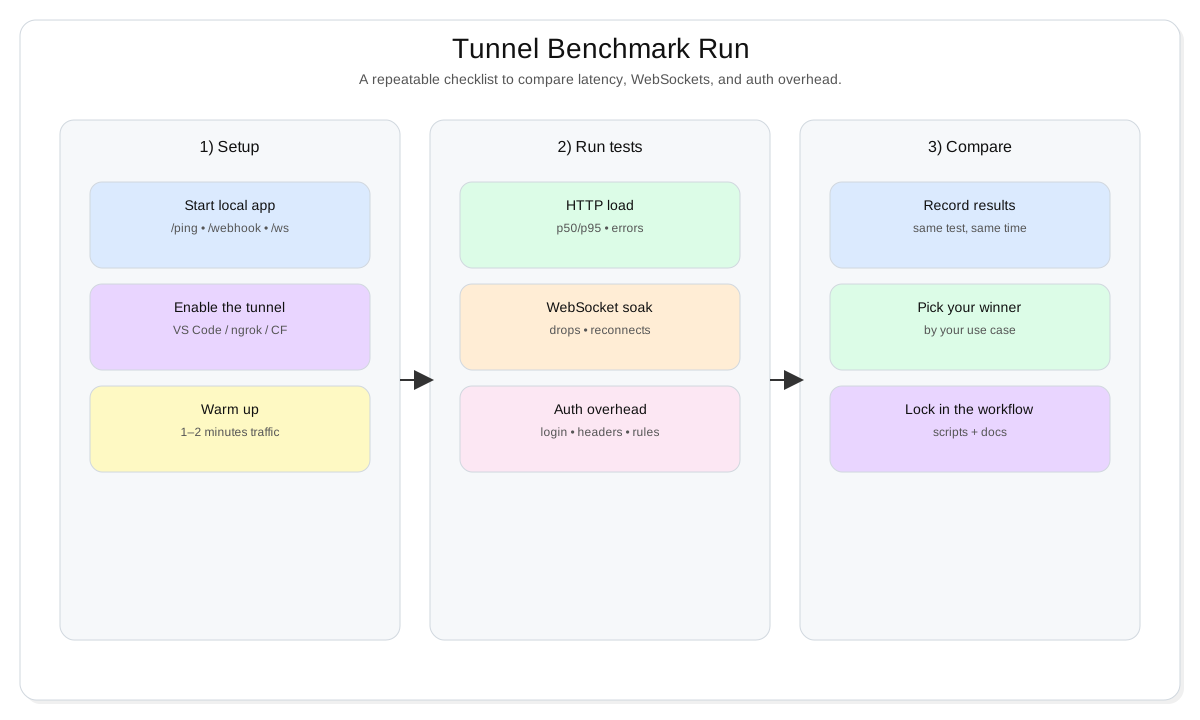
Tip: Don't compare tools on different days with different networks. Run all three back-to-back, on the same Wi-Fi, with the same test app.
Build a tiny test app
You can benchmark with any app, but a tiny "standard" test server makes comparisons fair.
This one gives you:
GET /pingfor latency testingPOST /webhookso you can simulate webhook callbacksWS /wsfor WebSocket stability testing
1) Create a folder and install deps
mkdir tunnel-bench
cd tunnel-bench
npm init -y
npm i express ws
2) Add server.js
import express from "express";
import http from "http";
import { WebSocketServer } from "ws";

const app = express();
app.use(express.json({ limit: "1mb" }));

// Optional basic protection for quick tests.
// Set BENCH_TOKEN to enable: BENCH_TOKEN=secret npm start
const BENCH_TOKEN = process.env.BENCH_TOKEN;
app.use((req, res, next) => {
    if (!BENCH_TOKEN) return next();
    const token = req.headers["x-bench-token"];
    if (token === BENCH_TOKEN) return next();
    res.status(401).json({ ok: false, error: "Missing/invalid x-bench-token" });
});

app.get("/ping", (req, res) => {
    res.json({ ok: true, ts: Date.now() });
});

app.post("/webhook", (req, res) => {
    // In real life you would verify signatures here.
    res.json({ ok: true, received: true });
});

const server = http.createServer(app);

// WebSocket echo server at /ws
const wss = new WebSocketServer({ server, path: "/ws" });
wss.on("connection", (ws) => {
    ws.send(JSON.stringify({ type: "hello", ts: Date.now() }));
    ws.on("message", (msg) => ws.send(msg));
});

const port = process.env.PORT || 3000;
server.listen(port, () => {
    console.log(`Bench server on http://localhost:${port}`);
});
3) Make sure Node runs it
If you're on Node 20+ and using ESM imports like above, add this to package.json:
{
    "type": "module",
    "scripts": {
        "start": "node server.js"
    }
}
Then start it:
npm startQuick check:
curl http://localhost:3000/pingThe seamless built-in: VS Code Port Forwarding
This is the "I need a link now" option.
If you already have the app running locally, VS Code can forward the port and give you a shareable URL without installing another tool.
The workflow
- Run your app (
npm start). - Open VS Code's Ports view (often inside the terminal panel).
- Add/forward port
3000. - Set visibility (private/public) and copy the URL.
What this feels like in practice:
- You're live coding.
- You forward a port.
- You paste a link in Slack.
- Your teammate sees the exact app you're running.
Benchmark notes for VS Code
- Latency: Usually "good enough" for normal HTTP, because it's optimized for dev sharing.
- WebSockets: Often works, but this is where you want to actually test (realtime apps are less forgiving than HTTP).
- Auth overhead: Convenient if the platform identity is already in place, but not as configurable as dedicated tunnel products.
Tip: Keep your tunnel surface area small. If possible, forward only the app port you need (and not database dashboards, admin tools, or internal services).
Where VS Code wins
- Quick pair programming
- "Can you check this for a minute?" reviews
- Fast demo links when you're already in the IDE
Where it can fail
- Long-running "staging-like" setups
- Anything that needs serious request inspection
- Team workflows where you want custom domains, stable URLs, or stricter access policies
The veteran contender: ngrok's speed and simplicity
ngrok became popular for a reason: it's fast to start, easy to use, and the debugging experience is chef's kiss when you're working with webhooks.
Install ngrok
Follow the
ngrokinstallaion guide from documentation. It's pretty straightforward.
The one-command setup
Start your local app, then:
ngrok http 3000You get a public URL. Point your webhook provider to:
https://<your-url>.ngrok-free.app/webhook(example)- or whatever URL your ngrok session gives you
Why ngrok is still the webhook king
If you've ever had a webhook "not firing" and you're not sure why, request inspection changes the game:
- You can see the exact request body and headers.
- You can replay a request without re-triggering the upstream event.
- You can confirm whether the issue is in your app, your tunnel, or your provider config.
Warning: Webhooks are untrusted input. Even in local dev, treat them like production traffic: validate signatures, validate payload shape, and don't trust user-supplied totals/prices.
Benchmark notes for ngrok
- Latency: Typically solid. The real win is consistency under normal dev load.
- WebSockets: Usually reliable, but still worth stress-testing if your app is realtime-heavy.
- Auth overhead: Good options, but you're usually trading convenience for plan limits or configuration time.
Where ngrok wins
- Webhook-heavy development (payments, GitHub apps, Slack bots)
- Debugging tricky integrations
- Sharing a link outside your org without extra setup
Where it can fall behind
- Cost-to-performance can feel painful if you only need basic sharing all day
- Some "enterprise-style" access control patterns can be more natural in a Zero Trust toolchain
The enterprise powerhouse: Cloudflare Tunnel
Cloudflare Tunnel is what you reach for when "this is not just a quick share" anymore.
It's especially attractive when you care about:
- keeping your origin private (outbound connector model)
- adding real access control (Zero Trust style)
- making the URL stable (sometimes even with a custom domain)
The fast local start
First open your terminal and install cloudflared with the below command:
For MAC
brew install cloudflaredFor Windows
winget install --id Cloudflare.cloudflaredFor Linux and other options, check the Cloudflare Documentation.
Then, for a quick run:
cloudflared tunnel --url http://localhost:3000That's usually enough to get a public URL and start testing.
If you want stable, repeatable workflows, you typically move to a named tunnel + config file setup.
Why Cloudflare often feels faster for real apps
Modern full-stack apps aren't just a single endpoint:
- initial HTML
- JS bundles
- images/fonts
- API calls
- realtime connections
Cloudflare's edge approach is designed for this kind of traffic pattern, and that usually shows up as fewer "tunnel lag" moments when you load heavier pages or hit the app from different networks.
Benchmark notes for Cloudflare
- Latency: Often shines when the app loads more assets or gets accessed repeatedly.
- WebSockets: Worth stress-testing; persistent connections are where weaker tunnels get exposed.
- Auth overhead: Usually the strongest story here, because access policies can be part of your workflow, not an afterthought.
Where Cloudflare wins
- "Local staging" that stays up for hours/days
- Team collaboration with stronger access control
- Remote dev machines and more serious workflows where stability matters
Where Cloudflare can feel heavier
- More moving parts (accounts, policies, config) compared to a one-liner tunnel
- You'll want to standardize the setup so the team doesn't reinvent it every week
The final verdict and workflow optimization
Here's the honest answer: there is no single "winner".
There is a best tool for a specific job.
Use this decision flow when you're choosing in the moment:
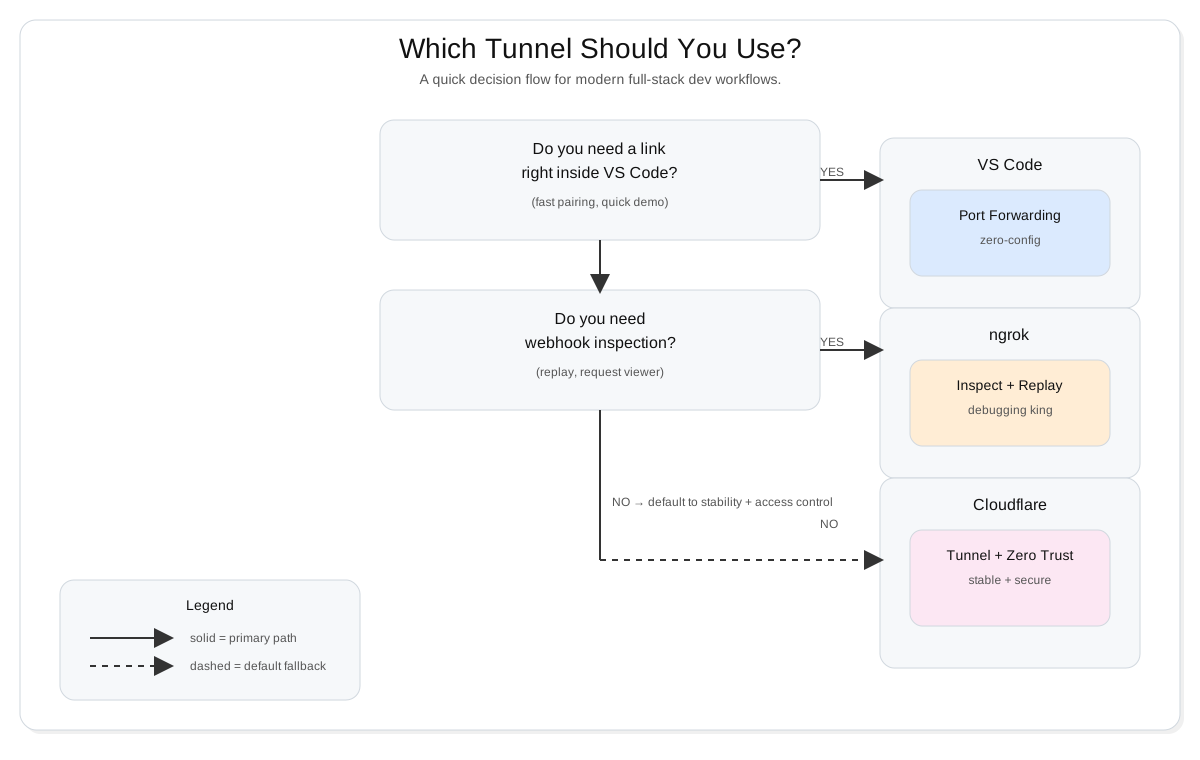
And here's a simple decision matrix you can keep in your README or team wiki:
| Use case | Best pick | Why |
|---|---|---|
| Quick demo during live coding | VS Code Port Forwarding | Fastest path to "here's a link" |
| Webhook debugging (inspect + replay) | ngrok | Developer UX is built for integrations |
| Long-running local staging | Cloudflare Tunnel | Stability + stronger access control |
| Realtime app with WebSockets | Run your benchmark | WebSockets expose weak tunnels fast |
| Sharing outside your org | ngrok or Cloudflare | Cleaner control over who can access |
The "Ultimate Stack" for 2026 workflows
If you want one practical setup that covers almost everything:
- Default: Cloudflare Tunnel for stable, secure, long-running dev links
- Debug mode: ngrok when you're deep in webhook troubleshooting
- Instant share: VS Code port forwarding for quick pairing moments
Tip: Treat this like tooling, not a religion. The best workflow is the one you can repeat in 30 seconds without thinking.
Recap
- Tunneling is no longer a "nice trick" - it's core dev infrastructure for webhooks, realtime apps, and remote collaboration.
- VS Code Port Forwarding is the fastest way to share a link from your IDE, but it's not designed for advanced debugging or long-lived environments.
- ngrok still dominates webhook workflows because inspection and replay save hours of guessing.
- Cloudflare Tunnel is the strongest choice when you want stability plus serious access control.
- If your app uses WebSockets, don't assume. Run the short benchmark and pick based on real behavior.
Show your Support
- ⭐ Follow this GitHub Repo
- 🍿 Subscribe on YouTube
- 🧑🏫 Follow us on LinkedIn, Facebook and X