Advanced Node.js Event Loop Patterns for High Concurrency
By Sumit Saha
Learn advanced Node.js event loop patterns for high concurrency by stress-testing libuv thread pool limits, measuring event loop lag, avoiding microtask starvation, and offloading CPU-heavy work with worker threads.

Your Node.js server usually doesn't fail because one line is slow.
It fails because many small decisions pile up.
A few async crypto calls. A few file reads. A large JSON conversion. A misplaced process.nextTick. Leaving a CPU-intensive endpoint on the main thread. Everything seems fine during normal traffic. But during real traffic, latency increases, requests start waiting, and the server starts behaving like a one-lane bridge.
This article will discuss that failure path.
We'll build a small Node.js lab, stress test it, break it down, measure its performance, and then rebuild its architecture with improved event loop discipline, libuv thread pool tuning, microtask control, worker threads, and observability.
Table of contents
- What we are really testing
- Install and verify Node.js
- Install and verify autocannon
- The invisible wall of Node.js scalability
- Build the first stress-test server
- Stress the default libuv thread pool
- Tune UV_THREADPOOL_SIZE carefully
- Microtask priority and starvation
- Offload CPU work with worker threads
- The high-concurrency blueprint
- Recap
What we are really testing
Node.js uses a main JavaScript thread to run your application code.
That doesn't mean that Node.js does everything in one thread.
Some expensive async operations are moved to the libuv worker pool. Examples of this are some crypto, zlib, file system, and DNS related tasks. Your JavaScript stays on the main thread, while the heavy native tasks are done elsewhere.
While this sounds safe, there is a problem.
The libuv worker pool is shared. Its default size is small. When very expensive operations enter that pool, new tasks wait in line. Your code still uses async and await, but the system is already backlogged.
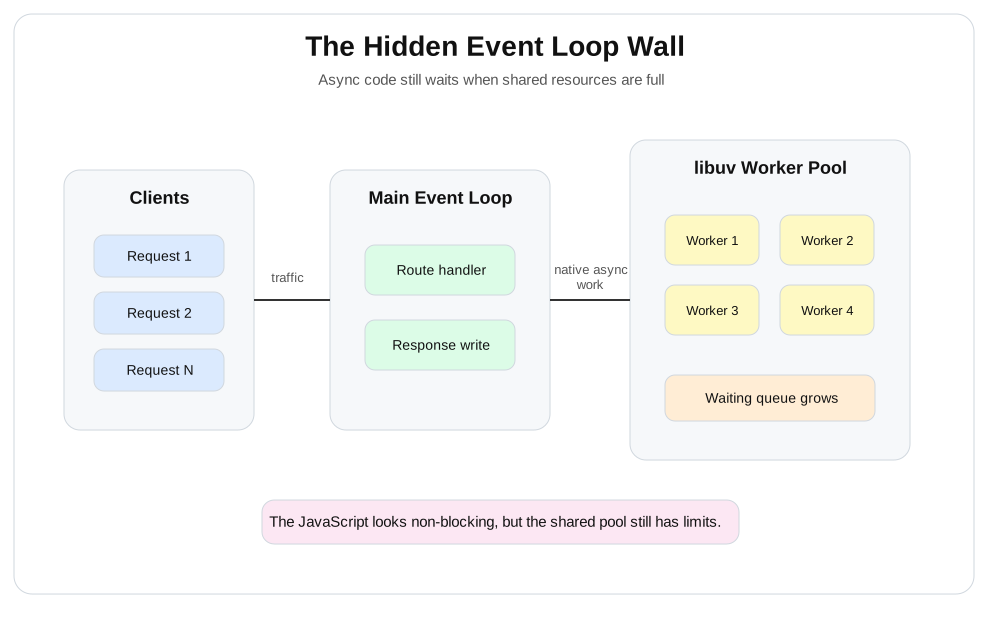
In the diagram above, the client sends a number of requests to a Node.js process. The main event loop accepts the requests, but expensive async tasks are pushed to a shared libuv worker pool. When the pool fills up, new operations wait in a queue, increasing latency even though the JavaScript code appears non-blocking.
Key idea:
asyncdoes not mean infinite. It means that the wait time is moved elsewhere.
Install and verify Node.js
We will use the Node.js runtime to run the server examples.
Install Node.js from the official Node.js installer, or use a version manager like nvm. For this lab, use Node.js 20 or later.
After installation, verify Node.js and npm:
node --version
npm --version
You should see version numbers, for example:
v22.x.x
10.x.x
Now create a project folder:
mkdir node-event-loop-lab
cd node-event-loop-lab
Install and verify autocannon
autocannon is a load-testing CLI for HTTP servers. We will use it to send many concurrent requests to our local Node.js server.
Install it globally with npm:
npm install -g autocannonVerify the installation:
autocannon --versionYou should see a version number.
Warning: Run these examples locally. Do not stress-test production systems or systems you do not own.
The invisible wall of Node.js scalability
The easiest mistake is to think this:
"My code uses async APIs, so it will not block."
This is only half true.
An async operation may avoid blocking the main JavaScript thread, but it still uses a real resource. This resource could be a LibV worker pool, a database connection pool, a network socket pool, memory, CPU, or disk.
High concurrency does not mean making everything async.
High concurrency is knowing which queue gets overloaded first.
Create the first stress-test server
Create a file called server.js:
const http = require("node:http");
const crypto = require("node:crypto");
const { monitorEventLoopDelay } = require("node:perf_hooks");
const { URL } = require("node:url");

const histogram = monitorEventLoopDelay({ resolution: 20 });
histogram.enable();

function sendJson(res, status, body) {
    res.writeHead(status, { "content-type": "application/json" });
    res.end(JSON.stringify(body));
}

function asyncHash(rounds = 120000) {
    return new Promise((resolve, reject) => {
        crypto.pbkdf2(
            "password",
            "salt",
            rounds,
            64,
            "sha512",
            (error, result) => {
                if (error) {
                    reject(error);
                    return;
                }

                resolve(result.toString("hex"));
            },
        );
    });
}

function syncHash(rounds = 120000) {
    return crypto
        .pbkdf2Sync("password", "salt", rounds, 64, "sha512")
        .toString("hex");
}

const server = http.createServer(async (req, res) => {
    const url = new URL(req.url, "http://localhost");

    if (url.pathname === "/health") {
        sendJson(res, 200, {
            eventLoopMeanMs: Math.round(histogram.mean / 1e6),
            eventLoopMaxMs: Math.round(histogram.max / 1e6),
            uvThreadpoolSize: process.env.UV_THREADPOOL_SIZE || "default",
        });

        histogram.reset();
        return;
    }

    if (url.pathname === "/hash") {
        const startedAt = Date.now();
        const rounds = Number(url.searchParams.get("rounds") || 120000);

        await asyncHash(rounds);

        sendJson(res, 200, {
            route: "/hash",
            mode: "async pbkdf2",
            durationMs: Date.now() - startedAt,
        });

        return;
    }

    if (url.pathname === "/sync-hash") {
        const startedAt = Date.now();
        const rounds = Number(url.searchParams.get("rounds") || 120000);

        syncHash(rounds);

        sendJson(res, 200, {
            route: "/sync-hash",
            mode: "sync pbkdf2",
            durationMs: Date.now() - startedAt,
        });

        return;
    }

    if (url.pathname === "/tick-storm") {
        let count = 0;
        const target = Number(url.searchParams.get("count") || 100000);

        function run() {
            count += 1;

            if (count >= target) {
                sendJson(res, 200, {
                    route: "/tick-storm",
                    scheduledTicks: count,
                });

                return;
            }

            process.nextTick(run);
        }

        run();
        return;
    }

    sendJson(res, 404, { error: "Not found" });
});

server.listen(3000, () => {
    console.log("Server running on http://localhost:3000");
});
Run the server:
node server.jsOpen this URL in your browser:
http://localhost:3000/healthYou should see JSON with event loop delay information.
Stress the default libuv thread pool
Now hit the async hash endpoint with concurrent traffic:
autocannon -c 20 -d 15 http://localhost:3000/hashThis endpoint uses crypto.pbkdf2, which runs through the libuv worker pool.
The route is async, but each request requires worker pool time. As the pool fills up, more work starts waiting. Latency increases as concurrency increases.
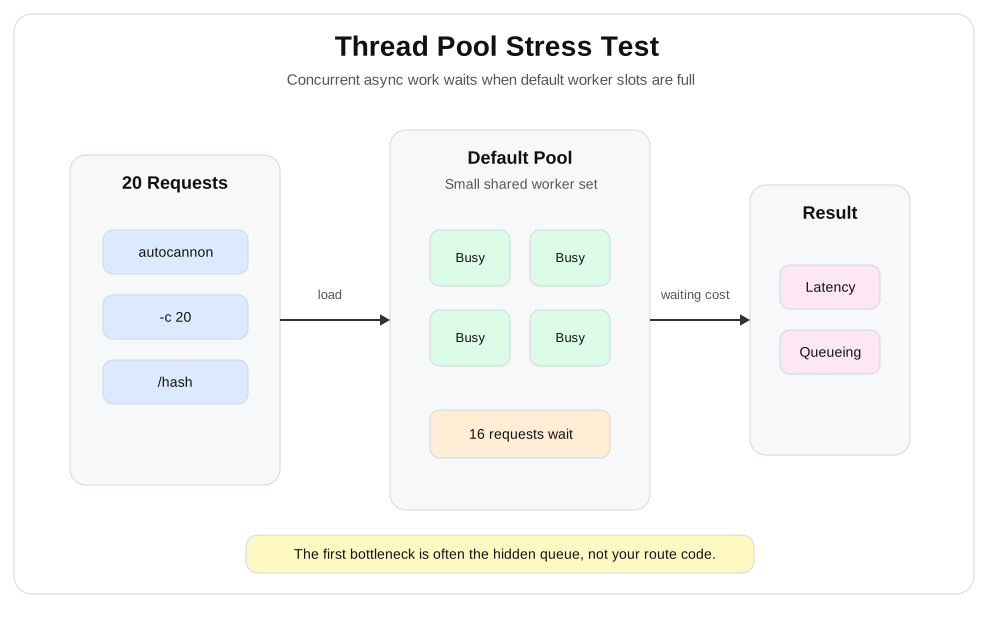
In the diagram above, twenty incoming requests arrive at the Node.js process. At first, four worker slots are busy, while the remaining requests wait in the queue. The main lesson is simple: async crypto work does not directly block JavaScript, but it creates a bottleneck when the worker pool is exhausted.
Now compare this to the sync version:
autocannon -c 20 -d 15 http://localhost:3000/sync-hashThe sync endpoint is even worse. It runs CPU-heavy tasks directly on the main JavaScript thread. At that time, the event loop cannot properly handle other requests.
Open this URL during the sync test:
http://localhost:3000/healthThe main thread may be busy, which can cause delays in getting a response.
Warning: If the main JavaScript thread is running a CPU-intensive task, the server doesn't just slow down. It stops processing other requests until that task is finished.
Tune UV_THREADPOOL_SIZE carefully
The size of the libuv worker pool can be changed using UV_THREADPOOL_SIZE in Node.js.
Stop the server.
On macOS or Linux, start it like this:
UV_THREADPOOL_SIZE=16 node server.jsOn Windows PowerShell, use:
$env:UV_THREADPOOL_SIZE = "16"
node server.js
Run the async hash test again:
autocannon -c 20 -d 15 http://localhost:3000/hashYou will see differences in latency behavior.
But don't think of it as a magic bullet.
A larger worker pool only helps when the worker pool is stalled due to waits. If the machine has limited CPU, increasing the pool too much will cause more context switching and stress. This also affects all code paths that use the same Node.js process.
Use this rule:
- If async native tasks are waiting even though there is room on the CPU, increasing the pool can help.
- If the CPU is already full, increasing the pool is usually detrimental.
- If a route is using up the entire pool, separate that workload or move it to workers.
- If the main event loop has high latency, first fix main-thread blocking.
Microtask priority and starvation
Microtasks run before the event loop moves on to the next step.
In Node.js, process.nextTick has a higher priority than a normal Promise microtask. Used carefully, it helps to finish the next small task in the current call stack. Used carelessly, it can interrupt timers, I/O callbacks, and new incoming requests.
Try this endpoint:
autocannon -c 5 -d 10 http://localhost:3000/tick-stormThis endpoint defines a long chain of process.nextTick callbacks. Each callback defines another callback. The event loop continues to empty that high-priority queue before moving on to the next step.
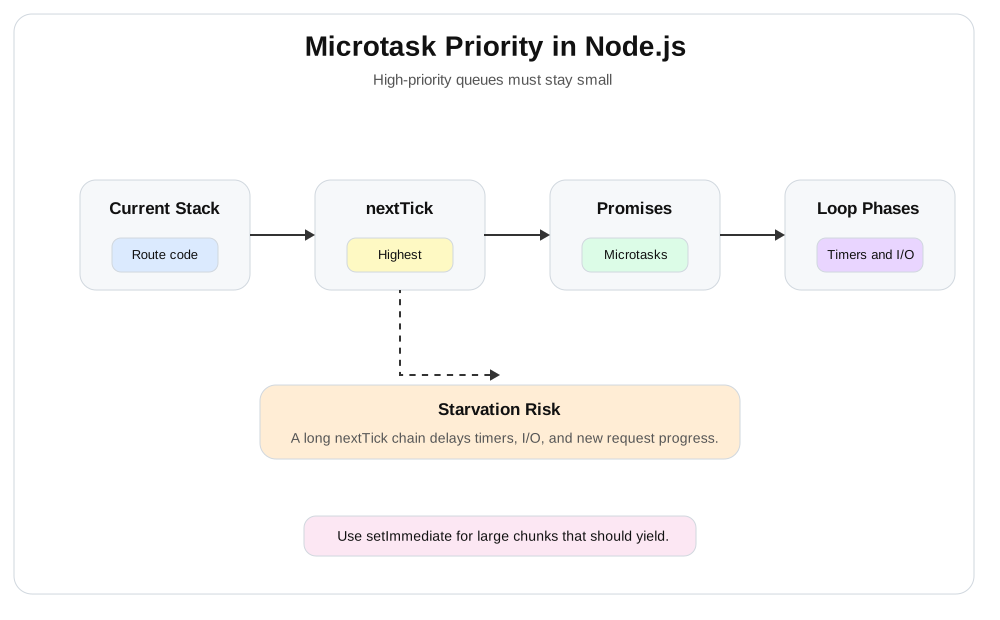
In the diagram above, the current JavaScript call stack is completed first. Node.js then empties the process.nextTick queue, then completes the Promise microtasks, and only then enters the normal event loop stages like timers and I/O callbacks. A long nextTick chain delays everything after it.
This pattern is incorrect:
function processLargeList(items, handler, done) {
    let index = 0;

    function run() {
        if (index >= items.length) {
            done();
            return;
        }

        handler(items[index]);
        index += 1;

        process.nextTick(run);
    }

    run();
}
Although this may seem async, it maintains control within the microtask path.
For larger tasks, use setImmediate to return to the event loop:
function processLargeListInChunks(items, handler, done) {
    let index = 0;

    function runChunk() {
        const end = Math.min(index + 500, items.length);

        while (index < end) {
            handler(items[index]);
            index += 1;
        }

        if (index < items.length) {
            setImmediate(runChunk);
            return;
        }

        done();
    }

    runChunk();
}
setImmediate gives I/O and other event loop phases room to breathe between chunks.
Tip: Use
process.nextTickfor small cleanup work after the current operation. Do not use it as a general-purpose batching system.
Offload CPU work with worker threads
The sync hash endpoint exposed the worst problem: CPU-intensive tasks on the main thread.
The solution is not async.
The solution is to move CPU-intensive tasks out of the main event loop.
Worker threads are useful when CPU parallelism is needed within the same Node.js application without forking a new process for each task.
Create a new file called worker-server.js:
const http = require("node:http");
const crypto = require("node:crypto");
const os = require("node:os");
const { Worker, isMainThread, parentPort } = require("node:worker_threads");
const { monitorEventLoopDelay } = require("node:perf_hooks");

if (!isMainThread) {
    parentPort.on("message", (job) => {
        const startedAt = Date.now();

        crypto.pbkdf2Sync("password", "salt", job.rounds, 64, "sha512");

        parentPort.postMessage({
            id: job.id,
            durationMs: Date.now() - startedAt,
        });
    });
} else {
    const histogram = monitorEventLoopDelay({ resolution: 20 });
    histogram.enable();

    class WorkerPool {
        constructor(size) {
            this.workers = Array.from({ length: size }, () =>
                this.createWorker(),
            );
            this.queue = [];
            this.nextId = 1;
        }

        createWorker() {
            const worker = new Worker(__filename);
            worker.busy = false;
            worker.currentJob = null;

            worker.on("message", (message) => {
                const job = worker.currentJob;

                worker.busy = false;
                worker.currentJob = null;

                if (job) {
                    job.resolve(message);
                }

                this.drain();
            });

            worker.on("error", (error) => {
                const job = worker.currentJob;

                if (job) {
                    job.reject(error);
                }

                const index = this.workers.indexOf(worker);

                if (index !== -1) {
                    this.workers[index] = this.createWorker();
                }
            });

            return worker;
        }

        run(rounds) {
            return new Promise((resolve, reject) => {
                this.queue.push({
                    id: this.nextId,
                    rounds,
                    resolve,
                    reject,
                });

                this.nextId += 1;
                this.drain();
            });
        }

        drain() {
            const worker = this.workers.find((item) => !item.busy);

            if (!worker || this.queue.length === 0) {
                return;
            }

            const job = this.queue.shift();

            worker.busy = true;
            worker.currentJob = job;
            worker.postMessage({
                id: job.id,
                rounds: job.rounds,
            });
        }

        stats() {
            return {
                workers: this.workers.length,
                busy: this.workers.filter((worker) => worker.busy).length,
                queued: this.queue.length,
            };
        }
    }

    function sendJson(res, status, body) {
        res.writeHead(status, { "content-type": "application/json" });
        res.end(JSON.stringify(body));
    }

    const cpuCount = os.availableParallelism
        ? os.availableParallelism()
        : os.cpus().length;
    const workerCount = Math.max(1, Math.min(cpuCount - 1, 4));
    const pool = new WorkerPool(workerCount);

    const server = http.createServer(async (req, res) => {
        const url = new URL(req.url, "http://localhost");

        if (url.pathname === "/health") {
            sendJson(res, 200, {
                eventLoopMeanMs: Math.round(histogram.mean / 1e6),
                eventLoopMaxMs: Math.round(histogram.max / 1e6),
                pool: pool.stats(),
            });

            histogram.reset();
            return;
        }

        if (url.pathname === "/worker-hash") {
            const startedAt = Date.now();
            const rounds = Number(url.searchParams.get("rounds") || 120000);
            const result = await pool.run(rounds);

            sendJson(res, 200, {
                route: "/worker-hash",
                mode: "worker thread",
                workerDurationMs: result.durationMs,
                totalDurationMs: Date.now() - startedAt,
                pool: pool.stats(),
            });

            return;
        }

        sendJson(res, 404, { error: "Not found" });
    });

    server.listen(3000, () => {
        console.log(`Worker server running on http://localhost:3000`);
        console.log(`Worker pool size: ${workerCount}`);
    });
}
Run it:
node worker-server.jsStress the worker endpoint:
autocannon -c 20 -d 15 http://localhost:3000/worker-hashThen open this URL in your browser while the test is running:
http://localhost:3000/healthThe CPU work still exists. The worker threads don't remove the cost. They remove the cost from the main event loop, so that the server can continue to run.
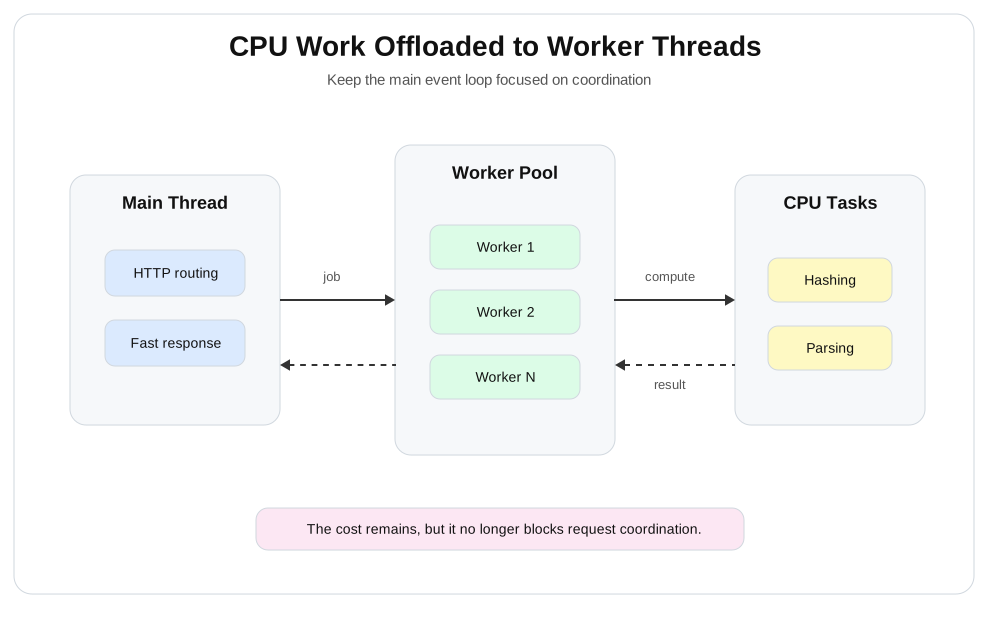
In the diagram above, the main event loop accepts HTTP requests and dispatches CPU-intensive tasks to a worker pool. Workers perform expensive computations and return the results. The main thread focuses on request handling, routing, writing responses, and light coordination.
A real production worker pool requires more than just this example:
- A maximum queue size
- Handling requests after they time out
- Backpressure when the queue is full
- Worker restart policy
- Metrics for each type of task
- Separate pools for different workloads
A simple decision rule:
function shouldScaleCpuPool({ queuedJobs, eventLoopLagMs, cpuIsAvailable }) {
    return queuedJobs > 100 && eventLoopLagMs < 30 && cpuIsAvailable;
}
If the queue is long, the event loop lag is low, and the CPU is available, adding more workers may help. If the event loop lag is high, adding workers does not solve the main-thread problem.
The high-concurrency blueprint
A high-concurrency Node.js architecture requires clear boundaries.
Don't let each route compete for the same hidden resource.
Divide work according to cost and urgency:
- Fast HTTP coordination resides in the main event loop.
- Native async tasks use the libuv worker pool with measured limits.
- CPU-bound tasks are moved to worker threads.
- Database calls use a separate connection pool with backpressure.
- Large background work is moved to a queue.
- Event loop delays are visible in queue depth and request latency metrics.
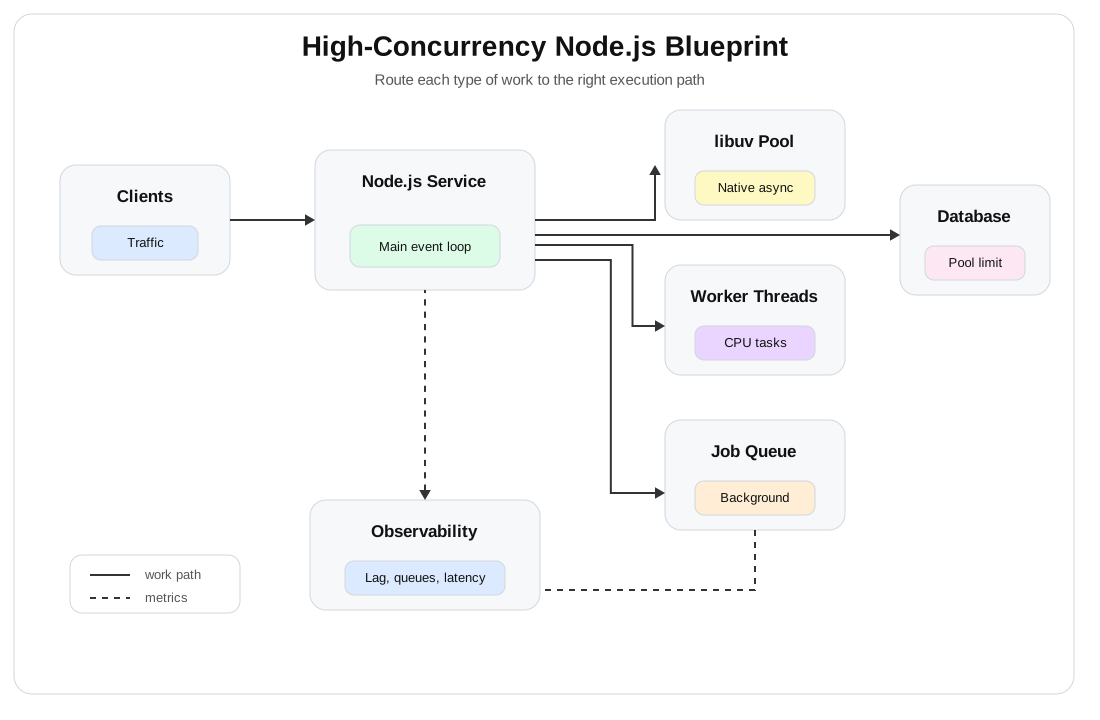
In the diagram above, client traffic enters an API gateway or load balancer, then reaches the Node.js service. The service handles lightweight requests in the main event loop, dispatches native async tasks to the libuv worker pool, dispatches CPU-intensive tasks to worker threads, and dispatches long-running background tasks to a queue. Observability monitors each layer, making bottlenecks visible before users experience them.
What to monitor in production
At minimum, track these metrics:
| Metric | Why it matters |
|---|---|
| Event loop delay | Shows when the main JavaScript thread is blocked or overloaded |
| Request latency | Shows what users feel |
| Worker pool queue depth | Shows CPU-bound job pressure |
| Error rate | Shows failure under load |
| Timeout count | Shows when downstream systems or queues are overloaded |
| CPU usage | Shows whether more concurrency is useful or harmful |
| Memory usage | Shows pressure from queues, buffers, and large objects |
The practical order of fixes
Before changing low-level settings, follow this sequence:
- Measure event loop delays.
- Find the sync CPU work on the main thread.
- Eliminate unintended microtask starvation.
- Tune
UV_THREADPOOL_SIZEfor native async bottlenecks only. - Move CPU-dependent logic to worker threads.
- Add backpressure before queues become unbounded.
- Separate critical and non-critical workloads.
- Re-monitor the system under load.
Recap
Node.js' high concurrency doesn't mean memorizing event loop diagrams.
The point is to find the queue that fills up first.
The main thread has only one job: keeping the server responsive. The libuv worker pool helps with some native async work, but it's shared and limited. Microtasks are useful, but abusing high-priority queues can be dangerous. Worker threads help with CPU-bound tasks, but they also require constraints, queues, timeouts, and observability.
The final lesson is simple:
Don't guess where Node.js is slow.
Create a small test, intentionally break it, measure the bottleneck, then move the right work to the right place.
Show your Support
- ⭐ Follow this GitHub Repo
- 🍿 Subscribe on YouTube
- 🧑🏫 Follow us on LinkedIn, Facebook and X